Building Grad-CAM From Scratch: Visual Explanations for CNNs
Paper Context
The background reading for this project clarified why Grad-CAM mattered as a generalization of the original CAM idea. The key shift is that Grad-CAM no longer requires architectural surgery or retraining: it reuses gradients flowing into the last convolutional layer to produce a class-specific localization map for an already trained CNN.
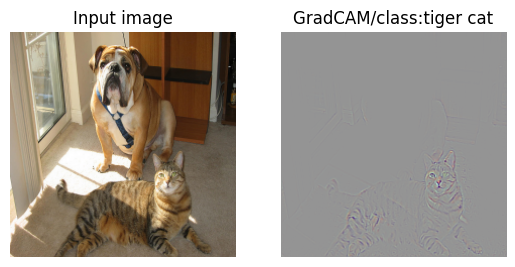
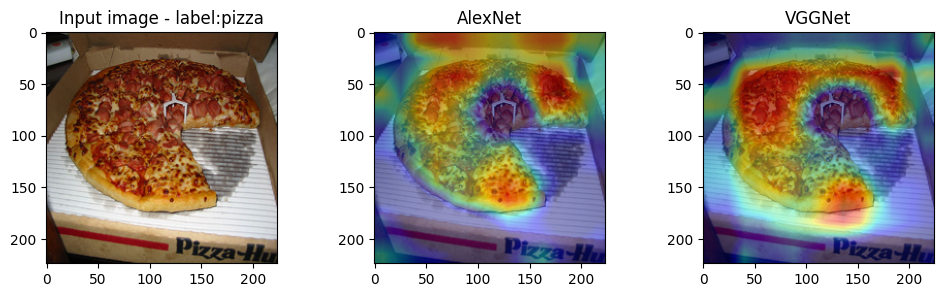
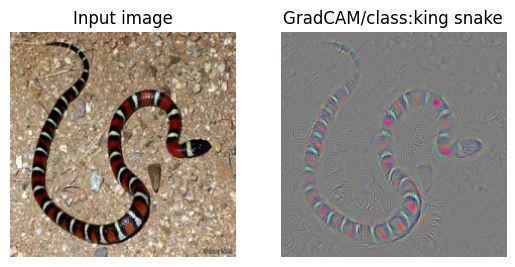
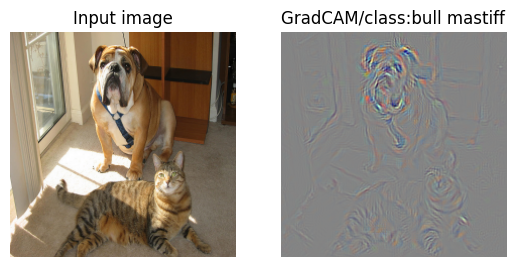
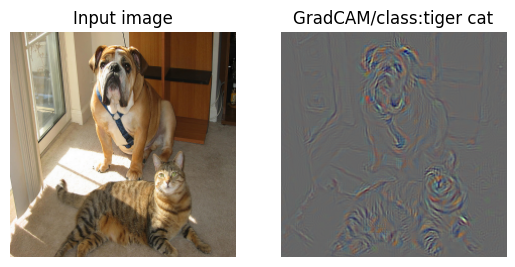
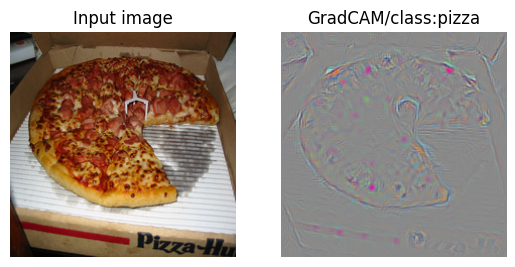
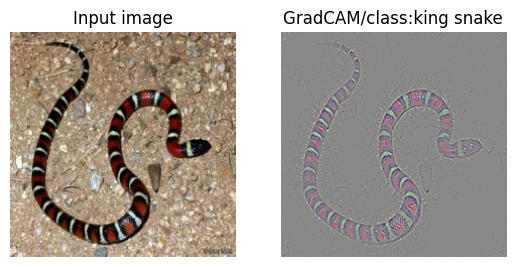
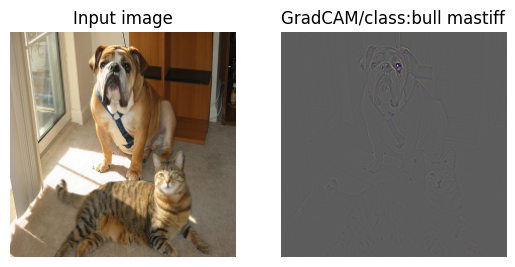
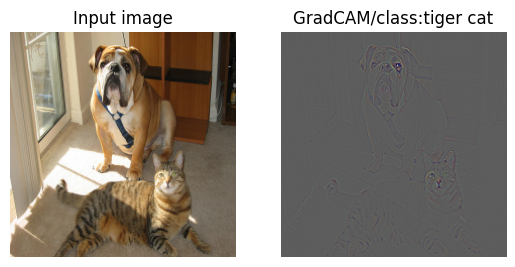
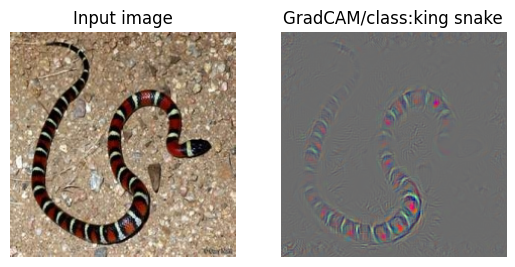
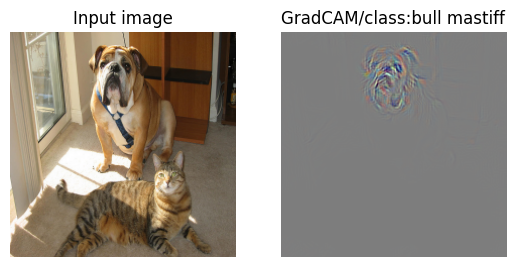
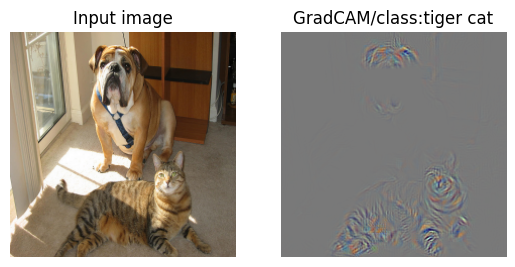
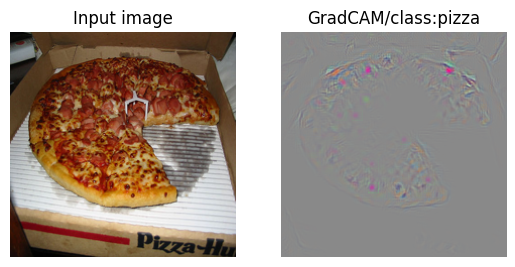
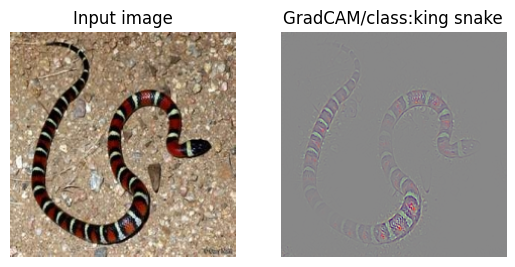
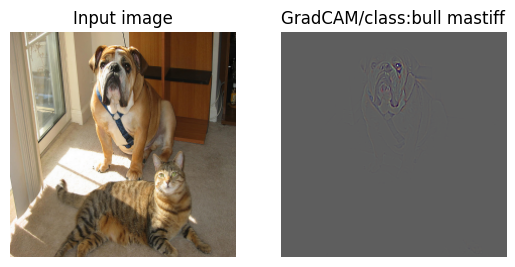
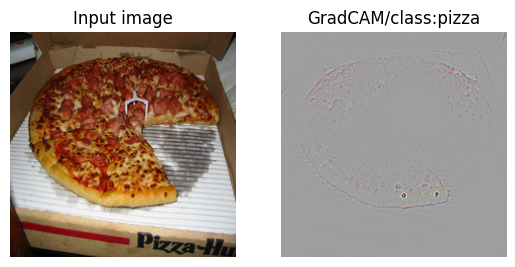
In practice, that tradeoff is what made the experiment useful. Grad-CAM gives a broad class-aware heatmap, Guided Backpropagation gives much sharper detail, and Guided Grad-CAM sits between the two. Running all three side by side made it much easier to see what each method was actually contributing.
Implementation Walkthrough
The sections below cover the hook setup, the Grad-CAM pipeline, and the resulting visualizations.
Grad-CAM with pretrained model (AlexNet[2], VGGnet[3])
Gradient-weighted Class Activation Mapping (Grad-CAM)[1]
- A techinique for producing ‘visual explanations’ for decisions from a CNN-based models
- Higlights the most important (discriminative) image regions related to the specific class
- Making CNN-based models more transparent
- Unlike in CAM, any architectural changes or retraining are not needed from any CNN-based networks
Framework of Grad-CAM
- A generic version of Class Activation Map(CAM)
- Using gradient information flowing into the last convolutional layer of the CNN to understanding the importance of each neuron for a decision
- Compute a weighted sum of the feature maps of the last convolutional layer to produce CAM
- Gradient of the score for class c, , with respect to feature maps() of the last convolutional layer,
- These gradients are global-average-pooled to obtain the neuron importance weights () :
- Grad-CAM mask produced with weighted combination of activation maps, followed by a ReLU:
++ This section focuses on Grad-CAM only; Guided Backpropagation appears later.
import numpy as np
import torch
import torch.nn as nn
import torch.optim as optim
import torch.nn.init as init
import torch.utils.model_zoo as model_zoo
import torch.nn.functional as F
import torchvision.transforms as transforms
import matplotlib.pyplot as plt

import cv2
import io
import requests
import os
import copy

from PIL import Image
from collections import OrderedDict

%matplotlib inline
# For torchsummary
try:
    from torchsummary import summary
except ModuleNotFoundError:
    !pip install torchsummary
    from torchsummary import summary
    pass
device = torch.device("cuda:0" if torch.cuda.is_available() else "cpu")
# hyper-parameters
image_size = 224
num_classes = 1000
Model (Pre-trained models)
Pretrained model definitions (AlexNet and VGG-16)
AlexNet
- Maxpooling after each convolutional layer
- Use ReLU as an activation function
- Dropout before the 1st and 2nd fully-connected layers
| Layer | Kernel size | stride | padding |
|---|---|---|---|
| 1st Conv | 11 | 4 | 2 |
| MaxPool | 3 | 2 | 0 |
| 2nd Conv | 5 | 1 | 2 |
| MaxPool | 3 | 2 | 0 |
| 3rd Conv | 3 | 1 | 1 |
| 4th Conv | 3 | 1 | 1 |
| 5th Conv | 3 | 1 | 1 |
| MaxPool | 3 | 2 | 0 |
#Pre-trained AlexNet from model_zoo
pretrained_AlexNet = {'alexnet': 'https://download.pytorch.org/models/alexnet-owt-4df8aa71.pth',}

class AlexNet_Block(nn.Module):
    def __init__(self, in_ch, out_ch, kernel_size, stride, padding, maxpool = False):
        super(AlexNet_Block, self).__init__()
        self.conv = nn.Conv2d(in_channels=in_ch, out_channels=out_ch,
                              kernel_size=kernel_size, stride=stride, padding=padding)
        self.relu = nn.ReLU(inplace=True)
        self.maxpool = None
        if maxpool:
            self.maxpool = nn.MaxPool2d(kernel_size=3, stride=2)

    def forward(self, x):
        x = self.conv(x)
        x = self.relu(x)
        if self.maxpool is not None:
            x = self.maxpool(x)
        return x

class AlexNet(nn.Module):
    def __init__(self, num_classes=num_classes):
        super(AlexNet, self).__init__()
        # use nn.Sequentials in constructors for slicability at required at Grad-CAM and simplicity
        self.features = nn.Sequential(
            nn.Conv2d(3, 64, 11, 4, 2),
            nn.ReLU(inplace=True),
            nn.MaxPool2d(3, 2, 0),
            AlexNet_Block(
                in_ch=64, out_ch=192, kernel_size=5, stride=1, padding=2, maxpool=True),
            AlexNet_Block(
                in_ch=192, out_ch=384, kernel_size=3, stride=1, padding=1),
            AlexNet_Block(
                in_ch=384, out_ch=256, kernel_size=3, stride=1, padding=1),
            nn.Conv2d(256, 256, 3, 1, 1),
            nn.ReLU(inplace=True),
            nn.MaxPool2d(3, 2, 0)
        )
        self.classifier = nn.Sequential(
            nn.Dropout(),
            nn.Linear(256 * 6 * 6, 4096),
            nn.ReLU(inplace=True),
            nn.Dropout(),
            nn.Linear(4096, 4096),
            nn.ReLU(inplace=True),
            nn.Linear(4096, num_classes),
        )

    def forward(self, x):
        # by using nn.Sequentials, forward() becomes very intuitive.
        x = self.features(x)
        x = x.view(x.size(0), -1)
        x = self.classifier(x)
        return x
VGGnet-16
- No batch normalization and initializtion of weights
- Model configuration is in the dictionary ‘cfg’
- Use ReLU as an activation function
- Dropout before the 2nd and last fully-connected layers
| Layer | Kernel size | stride | padding |
|---|---|---|---|
| Conv | 3 | 1 | 1 |
| MaxPool | 2 | 2 | 0 |
#Pre-trained VGGnet-16 from model_zoo
pretrained_vgg = {
    'vgg11': 'https://download.pytorch.org/models/vgg11-bbd30ac9.pth',
    'vgg13': 'https://download.pytorch.org/models/vgg13-c768596a.pth',
    'vgg16': 'https://download.pytorch.org/models/vgg16-397923af.pth',
    'vgg19': 'https://download.pytorch.org/models/vgg19-dcbb9e9d.pth',
}

cfg = {
    'A': [64, 'M', 128, 'M', 256, 256, 'M', 512, 512, 'M', 512, 512, 'M'],
    'B': [64, 64, 'M', 128, 128, 'M', 256, 256, 'M', 512, 512, 'M', 512, 512, 'M'],
    'D': [64, 64, 'M', 128, 128, 'M', 256, 256, 256, 'M', 512, 512, 512, 'M', 512, 512, 512, 'M'],
    'E': [64, 64, 'M', 128, 128, 'M', 256, 256, 256, 256, 'M', 512, 512, 512, 512, 'M', 512, 512, 512, 512, 'M'],
}

class VGGnet(nn.Module):
    def __init__(self, features, num_classes=num_classes):
        super(VGGnet, self).__init__()
        # from the usage of make_layers() we know that will return to VGGnet argument 'features'
        self.features = features
        self.classifier = nn.Sequential(
            nn.Linear(512 * 7 * 7, 4096),
            nn.ReLU(inplace=True),
            nn.Dropout(),
            nn.Linear(4096, 4096),
            nn.ReLU(inplace=True),
            nn.Dropout(),
            nn.Linear(4096, num_classes),
        )

    def forward(self, x):
        x = self.features(x)
        x = x.view(x.size(0), -1)
        x = self.classifier(x)
        return x

def make_layers(cfg, batch_norm=False):
    # gets the cfg defined above and makes VGGnet's feature extractor.
    # In this experiment however we only use cfg["D"]
    layers = []
    in_channels = 3
    for v in cfg:
        if v == 'M':
            layers += [nn.MaxPool2d(kernel_size=2, stride=2)]
        else:
            conv2d = nn.Conv2d(in_channels, v, kernel_size=3, padding=1)
            if batch_norm:
                layers += [conv2d, nn.BatchNorm2d(v), nn.ReLU(inplace=True)]
            else:
                layers += [conv2d, nn.ReLU(inplace=True)]
            in_channels = v
    return nn.Sequential(*layers)
Model instantiation (AlexNet and VGG-16)
# AlexNet
def alexnet(model, pretrained=False):
    pretrained_dict = torch.hub.load_state_dict_from_url(
        pretrained_AlexNet['alexnet'])  # returns state_dict
    # if model is designed correctly, the shape of state_dict is same
    pretrained_key = list(pretrained_dict)

    new_state_dict = OrderedDict()

    model_dict = model.state_dict()

    if pretrained: # fetching the pretrained entrypoint
        for i, (key, value) in enumerate(model_dict.items()):
            new_state_dict[key] = pretrained_dict[pretrained_key[i]]
        model.load_state_dict(new_state_dict)
    return model

model_AlexNet = alexnet(AlexNet(), pretrained=True)

# VGG-16, no batch_norm
def vggnet(model, pretrained=False):
    pretrained_dict = torch.hub.load_state_dict_from_url(
        pretrained_vgg['vgg16'])  # returns state_dict
    # if model is designed correctly, the shape of state_dict is same
    pretrained_key = list(pretrained_dict)

    new_state_dict = OrderedDict()

    model_dict = model.state_dict()

    if pretrained: # fetching the pretrained entrypoint
        for i, (key, value) in enumerate(model_dict.items()):
            new_state_dict[key] = pretrained_dict[pretrained_key[i]]
        model.load_state_dict(new_state_dict)
    return model

model_VGGnet = VGGnet(make_layers(cfg['D'], batch_norm=False))
model_VGGnet = vggnet(model_VGGnet, pretrained=True)
print("AlexNet's Summary:")
model_AlexNet.to(device)
summary(model_AlexNet, (3, 224, 224))

print("\nVGGnet's Summary:")
model_VGGnet.to(device)
summary(model_VGGnet, (3, 224, 224))
Grad-CAM mask generating and visualizing with given test images
#test images with ImageNet class number
test_list = (('../dataset-dllab/lab09/test_images/kingsnake.jpg', 56),
             ('../dataset-dllab/lab09/test_images/cat_dog.png', 243),
             ('../dataset-dllab/lab09/test_images/cat_dog.png', 282),
             ('../dataset-dllab/lab09/test_images/pizza.jpg', 963))

#imagenet class
imagenet_class = {56: 'king snake', 243: 'bull mastiff', 282: 'tiger cat', 963: 'pizza'}
Grad-CAM generator class
Grad-CAM generator class
- Use pre-trained models
- Similar to CAM generator class
- save_gradient : A backward hook function to save gradients w.r.t our target convolutional features
- Hook up this function to the target features in forward_model part of GradCAM class
- register_hook() is a function for tensor (e.g. itermediate features)
- register_backward_hook is a function for module (e.g. nn.Conv2d)
- References for hook function: [4],[5]
- forward_model : Forward pass of our pretrained model to produce the score of class() and activation maps()
- gen_CAM : Generating Grad-CAM mask with two inputs(img: input image, one_hot_target: one-hot-class of image)
- Produce feature maps and the score of class
- Computing gradient of the score for class with respect to the feature maps of the last convolutional layer
- Backward pass with one_hot_target input
- Global averaging of the gradients to obtain the weights
- Grad-CAM mask generating (weighted sum of the feature maps)
- Resizing the mask to the input image’s size
- cv2.resize function or other functions
- ReLU to obtain a final mask
- min-max normalization of mask for visualizing
++ The feature maps (activations) are the intermediate results of network before last pooling layer like the ones in CAM
class GradCAM():
    def __init__(self, model):
        self.model = model
        self.model.eval() # important to keep the results consistant
        self.gradient = None

    # A backward hook function to save gradients(weights for visualizing)
    def save_gradient(self, grad):
        self.gradient = grad

    def forward_model(self,x):
        # save x shape
        batch_size = x.size(0) # used for flattening

        # feature extraction
        x = self.model.features[:-1](x) # can slice since nn.Sequential

        # hook registeration
        h = x.register_hook(self.save_gradient) # hooked to save_gradient()
        activation_maps = x

        # remaining forward
        x = self.model.features[-1:](x) # this is the last maxpool layer
        x = x.view(batch_size, -1)
        x = self.model.classifier(x)
        return x, activation_maps.detach() # returns class scores and activation maps

    def gen_CAM(self, img, one_hot_target):
        # Forward pass, produce feature maps and score of classes
        scores, activation_maps = self.forward_model(img)  # input image is 4d BCHW
        self.model.zero_grad()

        # Backward pass with one_hot_target input to get the gradients from hook function
        loss = torch.sum(one_hot_target * scores)
        loss.backward()

        # Global averaging of the gradients to obtain the weights
        grad = self.gradient
        weights = torch.mean(grad, dim=[2, 3], keepdim=True)

        # Grad-CAM mask generating (weighted sum of the feature maps)
        grad_cam_map = torch.sum(
            weights * activation_maps, dim=1, keepdim=True)
        grad_cam_map = grad_cam_map.squeeze(0, 1).cpu().numpy()

        # Resize the mask to the input image's size
        grad_cam_map = cv2.resize(grad_cam_map, (img.shape[2], img.shape[3]))

        # ReLU to obtain a final mask
        grad_cam_map = np.maximum(grad_cam_map, 0)

        # Min-max normalization of mask for visualizing -> [0,1]
        grad_cam_map -= np.min(grad_cam_map)
        grad_cam_map /= np.max(grad_cam_map)

        return grad_cam_map
# image array to image tensor
def preprocess_image(img, resize_img=True):
    mean = [0.485, 0.456, 0.406]
    std = [0.229, 0.224, 0.225]

    if resize_img:
        img = img.resize((224,224))
    img_arr = np.float32(img)
    img_arr = img_arr.transpose(2, 0, 1)

    for c, _ in enumerate(img_arr):
        img_arr[c] /= 255
        img_arr[c] -= mean[c]
        img_arr[c] /= std[c]

    img_tensor = torch.from_numpy(img_arr).float()
    img_tensor = torch.unsqueeze(img_tensor,0)

    return img_tensor

#image tensor to image array
def reprocess_image(img):
    img = torch.squeeze(img,0)
    mean = [-0.485, -0.456, -0.406]
    std = [1/0.229, 1/0.224, 1/0.225]

    img_re = copy.copy(img.cpu().data.numpy())

    for c in range(3):
        img_re[c] /= std[c]
        img_re[c] -= mean[c]

    img_re[img_re > 1] = 1
    img_re[img_re < 0] = 0
    img_re = np.round(img_re * 255)

    img_re = np.uint8(img_re).transpose(1, 2, 0)

    return img_re
Grad_CAM Visulaization with given test images
AlexNet
# Instantiation
gradcam_Alex = GradCAM(model_AlexNet)
gradcam_VGG = GradCAM(model_VGGnet)

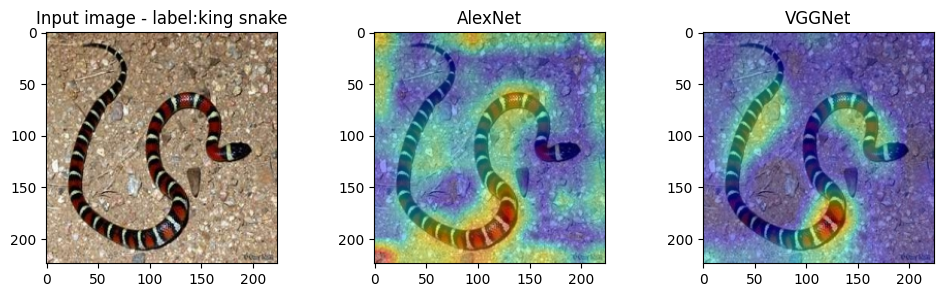
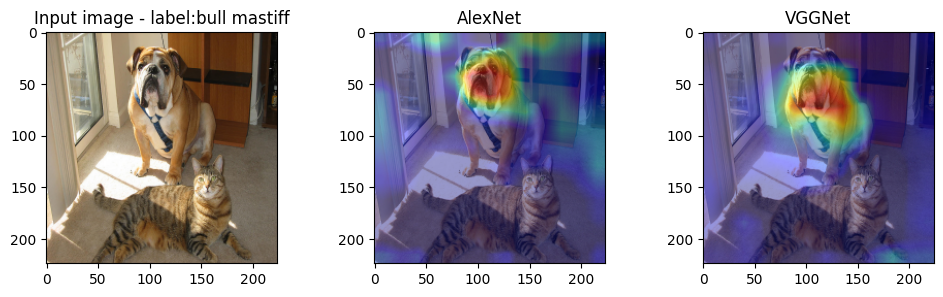
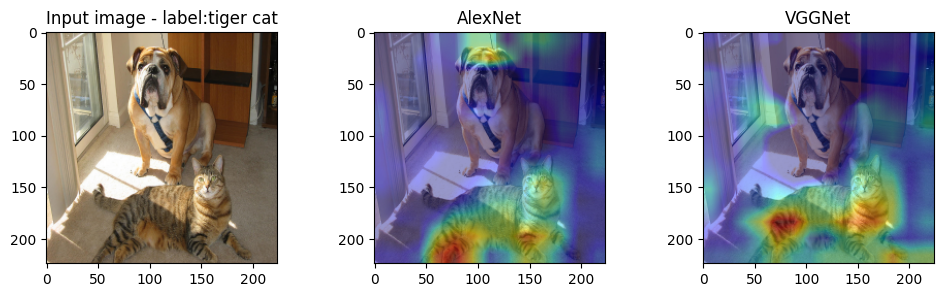
for i in range(len(test_list)):
    img_path = test_list[i][0]
    target_class = test_list[i][1]

    one_hot_target = torch.zeros([1, num_classes], dtype=torch.float)
    one_hot_target[0][target_class] = 1
    one_hot_target = one_hot_target.to(device)

    img_ = Image.open(img_path).convert('RGB')
    img = preprocess_image(img_)
    img = img.to(device)

    cam_img_AlexNet = gradcam_Alex.gen_CAM(img, one_hot_target)
    cam_img_VGGNet = gradcam_VGG.gen_CAM(img, one_hot_target)

    fig = plt.figure(figsize=(12, 3))
    fig.add_subplot(1,3,1).set_title('Input image - label:{}'.format(imagenet_class[target_class]))
    plt.imshow(reprocess_image(img))
    fig.add_subplot(1,3,2).set_title('AlexNet')
    plt.imshow(reprocess_image(img))
    plt.imshow(cam_img_AlexNet, alpha=0.4, cmap='jet')
    fig.add_subplot(1,3,3).set_title('VGGNet')
    plt.imshow(reprocess_image(img))
    plt.imshow(cam_img_VGGNet, alpha=0.4, cmap='jet')
    plt.show()
Guided Grad-CAM: Grad-CAM with Guided Backpropagation
- Grad-CAM visualization is class-discriminative (i.e. localize the target category) but not high-resolution (i.e. capture fine-grained detail)
- Pixel-space gradient visualizations such as Guided Backpropagation highlights fine-grained details in the image
- Two methods are fused to combine these two aspects (Pointwise multiplication in the figure below)
Guided Backpropagation[6]
- Before Guided Backprogation : two approaches for visualizing
1.The deconvolutional network (‘deconvnet’) an approach to visualizing concepts learned by neurons of a CNN [7]
- Given a high-level feature map, the ‘deconvnet’ inverts the data flow of a CNN, going from neuron activations in the given layer down to an input image
- Then the reconstructed image shows the part of the input image that is most strongly activating neurons in the given layer
- Reference for ‘deconvnet’ : [8]
2.An alternative way of visualizing the part of an image that most activates a given neuron is to use a simple backward pass of the activtaion of that neuron after a forward pass (‘backpropagation’)
- These two methods differ mainly in the way they handle backpropagtion through the rectified linear nonlinearity(ReLU) as in the figure below
- Guided Backpropagation combines these two methods:
Rather than masking out values corresponding to negative entries of the top gradient(‘deconvnet’) or bottom data(‘backpropagation), masking out the values for which at least one of these values is negative
Guided Backpropagation Visualization
class GBackprop():
    def __init__(self, model):
        self.model = model
        self.model.eval()
        # First layer of network where we register hook to
        self.first_layer = self.model.features[0]
        self.gradient = None
        # hook functions to relus
        self.hook_relu()

    def hook_img_grad(self, grad):
        self.gradient = grad

    # register hook to module(ReLU)
    def hook_relu(self):
        # To pass only positive gradients at ReLU
        def relu_gradient(module, grad_input, grad_output):
            if isinstance(module, nn.ReLU):
                return (torch.clamp(grad_input[0], min=0.0),)

        for module in self.model.features.modules():
            if isinstance(module, nn.ReLU):
                module.register_backward_hook(relu_gradient)

    def forward_model(self,x):
        x = self.model.features(x)
        x = x.view(x.size(0), -1)
        x = self.model.classifier(x)
        return x

    def gen_mask(self, img, one_hot_target):
        img.register_hook(self.hook_img_grad)

        output = self.forward_model(img)
        self.model.zero_grad()

        # for gradient computing with our specified class
        output.backward(gradient = one_hot_target)

        # our visualization mask (to array)
        self.gradient = self.gradient.detach().cpu().numpy()[0]

        # gradients mask
        gradients_mask = self.gradient.transpose(1,2,0)
        gradients_mask = (gradients_mask - np.min(gradients_mask))/\
            (np.max(gradients_mask) - np.min(gradients_mask) + 1e-08)

        return self.gradient, gradients_mask
AlexNet
guided_backprop = GBackprop(model_AlexNet)

for i in range(len(test_list)):
    img_path = test_list[i][0]
    target_class = test_list[i][1]

    one_hot_target = torch.zeros([1, num_classes], dtype=torch.float)
    one_hot_target[0][target_class] = 1
    one_hot_target = one_hot_target.to(device)

    img_ = Image.open(img_path).convert('RGB')
    img = preprocess_image(img_)
    img = img.requires_grad_().to(device)

    gradient_numpy, mask = guided_backprop.gen_mask(img, one_hot_target)

    fig = plt.figure()
    fig.add_subplot(1,2,1).set_title('Input image')
    imgplot = plt.imshow(reprocess_image(img))
    plt.axis('off')
    fig.add_subplot(1,2,2).set_title('GradCAM/class:{}'.format(imagenet_class[target_class]))
    imgplot = plt.imshow(mask)
    plt.axis('off')
VGGnet
guided_backprop = GBackprop(model_VGGnet)

for i in range(len(test_list)):

    img_path = test_list[i][0]
    target_class = test_list[i][1]

    one_hot_target = torch.zeros([1, num_classes], dtype=torch.float)
    one_hot_target[0][target_class] = 1
    one_hot_target = one_hot_target.to(device)

    img_ = Image.open(img_path).convert('RGB')
    img = preprocess_image(img_)
    img = img.requires_grad_().to(device)

    gradient_numpy,mask = guided_backprop.gen_mask(img, one_hot_target)

    figure1 = plt.figure()
    figure1.add_subplot(1,2,1).set_title('Input image')
    imgplot = plt.imshow(reprocess_image(img))
    plt.axis('off')
    figure1.add_subplot(1,2,2).set_title('GradCAM/class:{}'.format(imagenet_class[target_class]))
    imgplot = plt.imshow(mask)
    plt.axis('off')
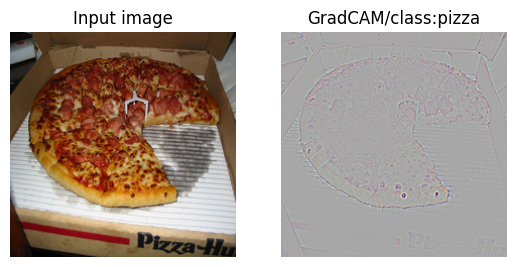
Guided Grad-CAM visualization
AlexNet
gradcam = GradCAM(model_AlexNet)
guided_backprop = GBackprop(model_AlexNet)

for i in range(len(test_list)):

    img_path = test_list[i][0]
    target_class = test_list[i][1]

    one_hot_target = torch.zeros([1, num_classes], dtype=torch.float)
    one_hot_target[0][target_class] = 1
    one_hot_target = one_hot_target.to(device)

    img_ = Image.open(img_path).convert('RGB')
    img = preprocess_image(img_)
    img = img.requires_grad_().to(device)

    cam_img = gradcam.gen_CAM(img, one_hot_target)
    gradient_numpy, mask = guided_backprop.gen_mask(img, one_hot_target)

    guided_gradcam = np.multiply(cam_img, gradient_numpy).transpose(1,2,0)
    guided_gradcam = (guided_gradcam - np.min(guided_gradcam)) /\
            (np.max(guided_gradcam) - np.min(guided_gradcam) + 1e-08)

    figure1 = plt.figure()
    figure1.add_subplot(1,2,1).set_title('Input image')
    imgplot = plt.imshow(reprocess_image(img))
    plt.axis('off')
    figure1.add_subplot(1,2,2).set_title('GradCAM/class:{}'.format(imagenet_class[target_class]))
    imgplot = plt.imshow(guided_gradcam)
    plt.axis('off')
VGGnet
gradcam = GradCAM(model_VGGnet)
guided_backprop = GBackprop(model_VGGnet)

for i in range(len(test_list)):

    img_path = test_list[i][0]
    target_class = test_list[i][1]

    one_hot_target = torch.zeros([1, num_classes], dtype=torch.float)
    one_hot_target[0][target_class] = 1
    one_hot_target = one_hot_target.to(device)

    img_ = Image.open(img_path).convert('RGB')
    img = preprocess_image(img_)
    img = img.requires_grad_().to(device)

    cam_img = gradcam.gen_CAM(img, one_hot_target)
    gradient_numpy, mask = guided_backprop.gen_mask(img, one_hot_target)

    guided_gradcam = np.multiply(cam_img, gradient_numpy).transpose(1,2,0)
    guided_gradcam = (guided_gradcam - np.min(guided_gradcam))/\
            (np.max(guided_gradcam) - np.min(guided_gradcam) + 1e-08)

    figure1 = plt.figure()
    figure1.add_subplot(1,2,1).set_title('Input image')
    imgplot = plt.imshow(reprocess_image(img))
    plt.axis('off')
    figure1.add_subplot(1,2,2).set_title('GradCAM/class:{}'.format(imagenet_class[target_class]))
    imgplot = plt.imshow(guided_gradcam)
    plt.axis('off')
References
[1] https://arxiv.org/pdf/1610.02391.pdf
[2] https://papers.nips.cc/paper/4824-imagenet-classification-with-deep-convolutional-neural-networks.pdf
[3] https://arxiv.org/pdf/1409.1556.pdf
[4] https://bob3rdnewbie.tistory.com/320
[5] https://pytorch.org/docs/stable/autograd.html#torch.Tensor.register_hook
[6] https://arxiv.org/pdf/1412.6806.pdf
[7] https://arxiv.org/pdf/1311.2901.pdf
[8] https://medium.com/@jamesvanneman/paper-club-visualizing-and-understanding-convolutional-networks-629fef9ceb8b
Discussion
The final outputs were straightforward to interpret once both AlexNet and VGGNet were running through the same Grad-CAM pipeline.
Quantitative
The torchsummary output confirmed that both the AlexNet and VGGNet implementations matched the expected parameter counts and aligned with the pretrained checkpoints used in the experiment.
Qualitative.
The Grad-CAM and Guided Grad-CAM outputs largely matched the paper’s claims. The heatmaps stayed on the dominant object region in both networks, while Guided Grad-CAM suppressed most of the irrelevant background. In the bull mastiff versus tiger cat example, the localization stayed on the correct subject, and in the fruit example the missing slice drew much less attention than the intact pieces.